I was asked to make a BTS fan map. But one condition came with it — always make it clear on screen that this is not an official project, and never mix up places BTS actually visited with places where official events were held. This was the first project where it was nailed down from the very start that it's a map made by fans.
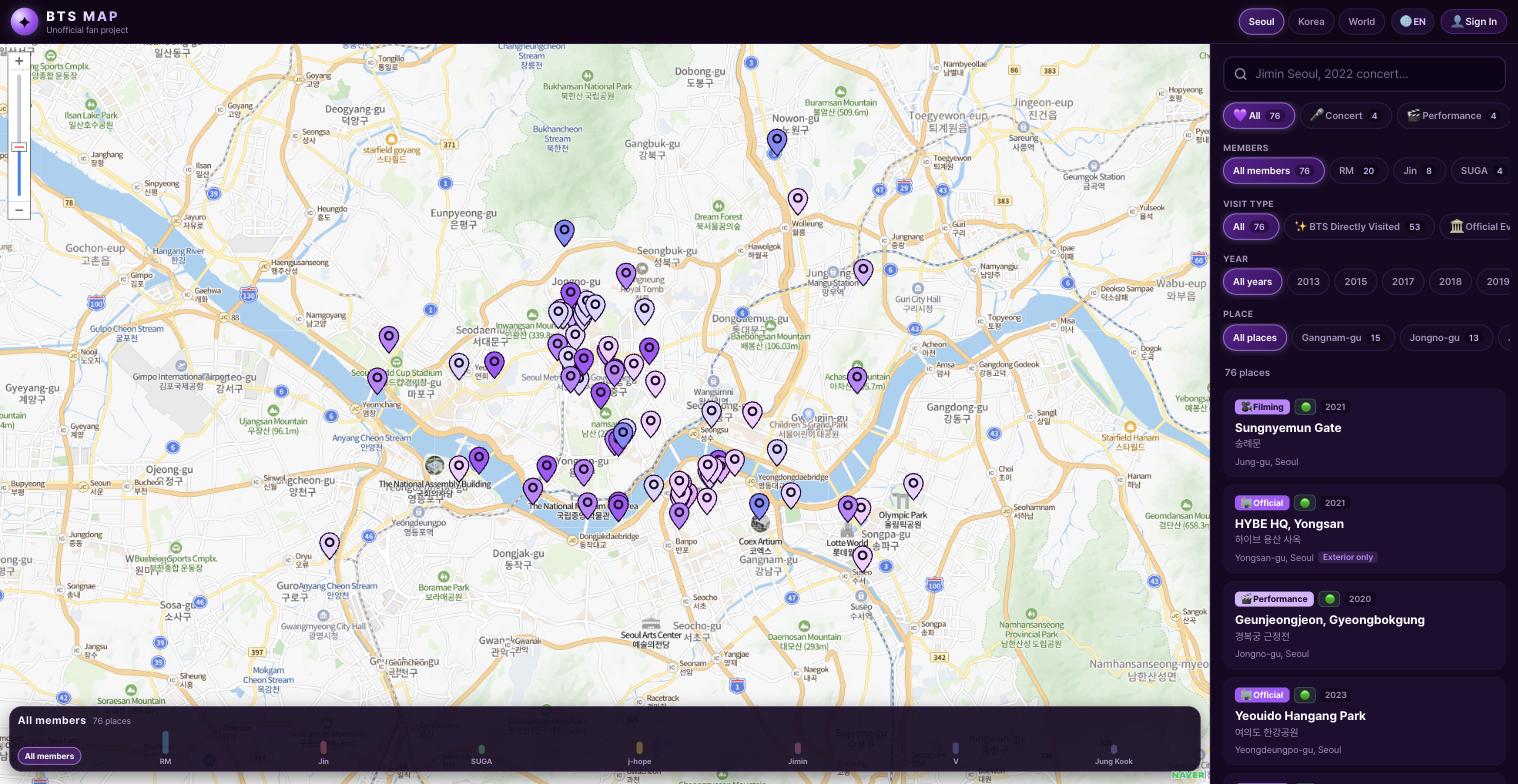
Split visit types into two
I was told to show "BTS Directly Visited" and "Official Event" in different colors from the start. Of the 76 places, there could be no confusion about which ones the members actually walked through and which were just official event venues. There was even a rule not to list any place at the level of "I heard they came here" without a source. Lumping the two kinds together would have been much simpler, but once I heard "this distinction is the whole point of the map," I understood why it was so strict.
Add every member and year filter
I was told to make individual filters for all seven members, starting with RM, Jin, and Suga, and to let you filter by year from 2013 to now. Plus a member timeline scrubber at the bottom of the screen — three layers of filters stacked on one map. Every time I added a filter I gently asked, "Isn't this enough?" and each time the answer was "This one has to be there," so it only ended once all three layers were filled. I only understood after it was all built that the map gets fun when you stack the filters together.
Think about multiple languages too
I was told to split the map scope into Seoul, Nationwide, and Global, and to add a Korean/English toggle. The logic was that the fan community is big overseas, so Korean alone wouldn't do. All 76 place descriptions had to be put into English as well, and translating took longer than plotting the map coordinates. A lot of expressions were awkward when translated literally, so in several places I rewrote the sentences entirely.
Removing the unofficial label was suggested, then immediately canceled
Once the map was mostly done, someone said the "Unofficial fan project" label next to the logo made the screen feel a bit cramped. So I briefly made a version without it, and the next day the answer came back: "That must never be removed." The original condition, not being mistaken for an official project, came before design. I scrapped the one-day draft, and it was a little ironic that I'd almost forgotten why the condition was set in the first place.
Of the candidates, 12 places with shaky sources were dropped
If you included every "they came here too" place floating around among fans, it would be well over 76. But I was told to exclude everything that couldn't be confirmed by news articles or official social media, so I pulled 12 places from the candidate list. Instead of lamenting it, we settled on "add the unconfirmed ones later, when evidence turns up."
I learned for the first time how fierce fan communities are
For the first few days after launch there wasn't much reaction. Then the link spread through a fan community and visitors jumped in a single day, and at the same time came a flood of "this place is in the wrong location." More coordinates were slightly off than I'd thought. The instruction was to fix each one as soon as it was reported, and I corrected coordinates one at a time while hearing "with a fandom this quick to react, every error will be caught within a few days." It was a scary but welcome speed of verification.
How to use it: member and year filters can be combined
The member filter at the bottom of the map (all seven: RM, Jin, Suga, and the rest) and the year timeline scrubber can be on at the same time. For example, narrow it to "Jungkook, 2019," and only the places Jungkook went that year stay on the map. Dark markers mean "BTS Directly Visited" (places members actually visited), and light markers mean "Official Event" (official event venues), so you can tell the two apart by color alone. The language button at the top right switches between Korean and English, and the Seoul, Nationwide, and Global tabs widen the map's scope. If you spot a marker that seems to be in the wrong place, you can report it right away with the "Report" button at the bottom of the marker's detail card.